

I still remember my first trip to Chile a few years ago—an experience that’s burned into my memory, and not in a good way.
The plane touched down at a small airport near Patagonia. After more than ten hours in the air, I dragged my exhausted body and heavy hiking backpack through the terminal. My plan was simple: connect to the airport WiFi, activate the eSIM I’d purchased ahead of time, and grab an Uber straight to my hotel.
Guess what? The airport WiFi was completely down.
There I stood in the chilly airport lobby, phone disconnected from the world. I couldn’t activate my eSIM, couldn’t call an Uber, couldn’t open Google Maps, and couldn’t even look up my hotel address. That feeling of helplessness—like suddenly losing all your senses in a foreign country—was absolutely crushing.
Eventually, I had no choice but to jump into a random taxi. The driver took one look at me—clearly a tourist—and noticed I had no internet to track the route. That’s when the “scenic detour” began. What should’ve been a 20-minute drive turned into an hour-long journey, and the fare tripled. I sat there knowing I was being ripped off but completely powerless to do anything about it.
If my phone had been connected, all of this could’ve been avoided.
That painful lesson taught me something crucial: When you’re travelling abroad, having internet on your phone isn’t just convenient—it’s about safety and control. In 2026, travelling without internet is like walking with your eyes closed. Every step is risky.
Since that trip, I’ve made it my mission to figure out the best travel internet solutions. Over the years, I’ve tested more than 15 eSIM providers, installed over 100 different eSIM plans, and travelled across Asia, Europe, the Americas, and even Africa. After countless real-world tests, I can say with confidence: Based on my 2026 testing, Holafly remains the top choice for heavy data users and travellers who value convenience—especially when you need unlimited data.
In this article, I’m sharing everything I’ve learned from years of using Holafly—the honest pros and cons, step-by-step setup guides, and my exclusive discount code. Whether this is your first international trip or you’re a seasoned backpacker or digital nomad, this guide will be your essential digital survival manual before departure.
🎁 Exclusive Reader Perk: Ready to Hit the Road?
Click this link https://holafly.go.link/frAhZ to get 5% off your order and stay connected from the moment you land!
Table of Contents
📱 What is eSIM? How It’s Revolutionizing Travel
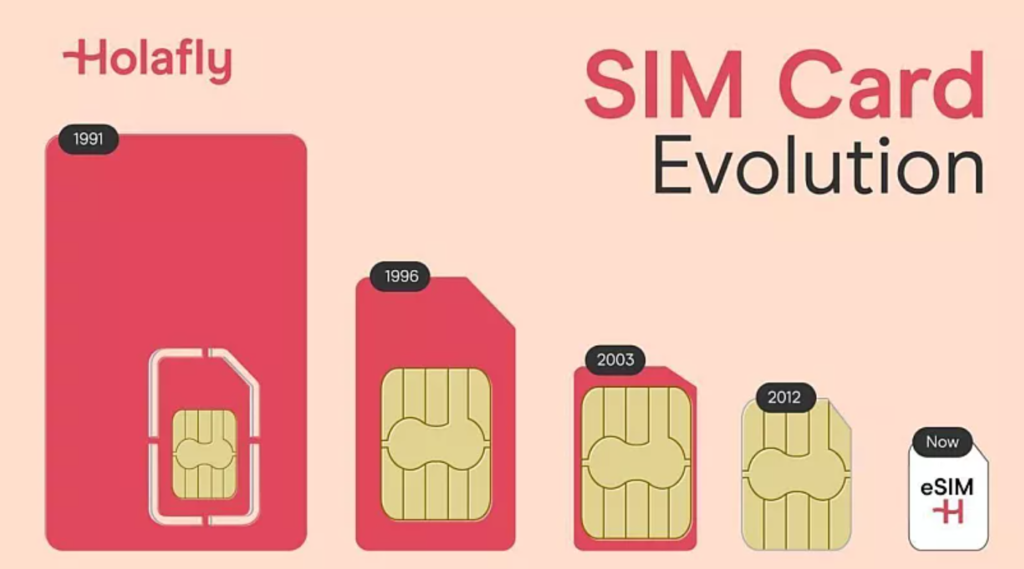
eSIM Basics
Simply put, eSIM (Embedded SIM) is a digital SIM card built right into your phone. You don’t need to insert those tiny physical SIM cards anymore, and you don’t have to worry about losing them or mixing them up. It’s completely virtual—just scan a QR code and it’s written directly to your phone’s chip.
In 2026, mainstream flagship phones including the iPhone 17 series and Samsung Galaxy S25 all support eSIM. Some models have even ditched the physical SIM tray entirely, making eSIM the standard for travel. For users with these newer phones, eSIM isn’t just an option—it’s the only choice.
Pain Points of Traditional Travel Internet Options
Let’s recap the frustrations of getting online abroad in the past:
❌ The Hassle of Physical SIM Cards:
- Wasting precious travel time queuing at the airport to buy a local SIM
- Needing a paperclip or SIM ejector tool to swap cards
- The nerve-wracking card swap, terrified the tiny thing will drop on the floor or disappear into an airplane seat crack
- Finding somewhere safe to store your original SIM and remembering to swap it back when you get home
- Those tiny cards are ridiculously easy to lose
❌ International Roaming Issues:
- Still pricey (while carriers have lowered rates to around CAD$15-30/day, Holafly’s long-term plans average just CAD$5-6/day—a savings of roughly 70%)
- Constant anxiety about roaming charges, so you don’t dare scroll Instagram or watch videos
- Desperately hunting for free WiFi at every tourist spot
❌ WiFi Hotspot Device Headaches:
- Carrying an extra device adds weight to your luggage
- Daily charging required—dead battery means no internet
- Can’t stray too far from the device, limiting your mobility
- Rental fees plus insurance add up quickly
- Lose it and you’re on the hook for replacement costs
How eSIM Solves All These Problems
✅ Buy Online, Instant QR Code Delivery
No airport queues—purchase from home and receive your QR code within seconds.
✅ Super Easy Setup in 5 Minutes
No tech skills needed—even my parents can do it themselves. Plus, the 2026 app update now supports automatic installation, eliminating the need to scan QR codes. Just tap a button in the app and you’re set. This perfectly solves the “how do I scan a QR code with only one phone?” problem.
✅ Keep Your Original Number Active
WhatsApp, Line, and bank verification codes all keep working—no number change required. Even better, Holafly’s European unlimited plans and global monthly subscriptions now include an Austrian (+43) phone number for receiving SMS and calls (60 minutes of free incoming calls). This is crucial for receiving bank OTP codes, Uber verifications, or restaurant reservations while travelling.
✅ Unlimited Data Plans (Holafly’s Specialty)
Holafly offers rare “all-you-can-use” plans on the market—no worrying about running out. However, based on each country’s carrier Fair Usage Policy (FUP), it’s recommended to keep daily high-speed data usage under 3GB to ensure you enjoy 4G/5G speeds throughout your trip. If you exceed that in a single day, speeds may temporarily slow down, but you’ll never lose connection, and speeds reset the next day. For typical travel needs like map navigation, social media sharing, and video calls, this is more than enough.
✅ Way Cheaper Than Roaming
For example, a 5-day US plan costs around CAD$45 (CAD$9/day). Choose a 30-day plan or monthly subscription, and daily costs drop to CAD$5-6—several times cheaper than traditional roaming.
Complete eSIM vs Other Internet Options Comparison
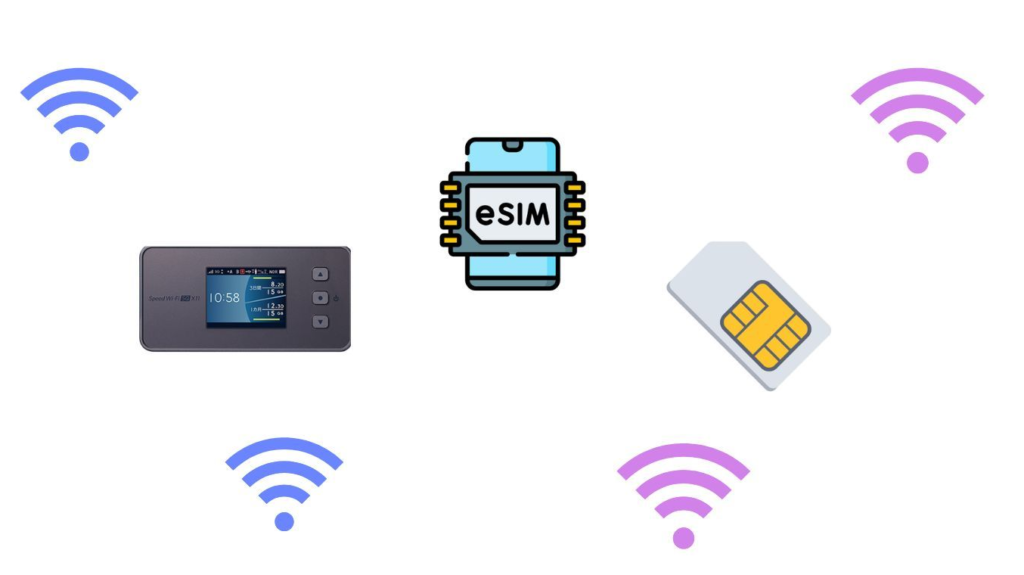
| Category | eSIM | Physical SIM Card | WiFi Hotspot | International Roaming |
|---|---|---|---|---|
| Purchase Method | Buy online, instant delivery | Airport/online purchase | Airport rental/online | Apply through carrier |
| Setup Difficulty | ⭐⭐⭐⭐⭐ Super easy (2026 update: App direct install, no QR code needed) | ⭐⭐⭐ Requires swapping | ⭐⭐ Must carry device | ⭐⭐⭐⭐ Auto-activates |
| Loss Risk | ✅ No risk | ❌ Easy to lose | ❌ Device to protect | ✅ No risk |
| Battery Drain | ✅ Direct phone connection | ✅ Direct phone connection | ❌ Requires charging | ✅ Direct phone connection |
| Multi-User | ✅ Supported (500MB-1GB daily high-speed hotspot) | 🔶 Hotspot sharing | ✅ Multiple users | 🔶 Hotspot sharing |
| Price Range | $1.5-5 USD/day | $2-5 USD/day | $3-8 USD/day | $10-15 USD/day |
| Best For | Solo/couple travel | Budget travellers | Families/groups | Those who don’t want to prep |
💡 Bottom Line: For solo or couple travel, eSIM is the best choice. For families or larger groups (4+ people), a WiFi hotspot might be more cost-effective.
🏆 Why I Choose Holafly
After testing so many eSIM brands on the market (including Airalo, Nomad, Ubigi, DJB, Verizon, and others), Holafly stands out with its unique product positioning and quality service.
Holafly Company Background
- Founded: 2017
- Headquarters: Dublin, Ireland
- Founders: Pedro Máiquez and Lidia Hu
- Coverage: 200+ countries and regions
- Customers Served: Over 15 million travellers
- User Rating: Trustpilot 4.6/5 (over 75,000 genuine reviews)
- Revenue: Surpassed $500 million USD (as of 2025)
- Sustainability: Carbon neutral by 2028
Holafly is one of the earliest companies to focus specifically on travel eSIM and is currently the most mature and reliable brand on the market.
✨ Holafly’s 10 Core Advantages: In-Depth Analysis
1️⃣ True Unlimited Data – No More Worrying About Running Out

Holafly is the most established and widely available unlimited data provider on the market.
Most eSIM providers (like Airalo) sell fixed data packages (1GB, 3GB, 5GB, 10GB). But modern travellers burn through way more data than you’d think:
- Social Media (Instagram/TikTok): High-quality videos and images can eat up 1GB – 2GB per hour
- Google Maps Navigation: Uses less data normally, but satellite view mode can quickly drain your allowance
- YouTube Videos: Around 500MB per hour at standard quality, more at HD
- Music Streaming (Spotify): About 50-100MB per hour
- Background Updates: iCloud photo backups and automatic app updates silently gobble up data without you realizing it
According to Holafly’s data calculator, if you’re scrolling through social media for 2 hours daily, using Google Maps for navigation, and occasionally watching YouTube, you could easily burn through 2-3GB per day.
If you buy a “7-day 5GB” plan, you’ll likely run out by day two or three. Then you’re stuck buying expensive top-up packages, which ends up costing you way more in the long run.
Holafly’s unlimited data gives you ultimate peace of mind:
- ✅ Watch YouTube videos without worrying
- ✅ Post Instagram Stories anytime
- ✅ Keep Google Maps running all day
- ✅ Video call your family back home with no issues
- ✅ Stream music as much as you want
- ✅ Stop constantly checking your data usage
🔍 Fair Usage Policy Explained:
While Holafly advertises “unlimited data,” local carriers dynamically monitor daily usage to prevent individual users from hogging too much bandwidth. If you exceed 3GB-5GB of high-speed data in a single day, your speed might be temporarily throttled (from high-speed 4G/5G down to 2G/3G speeds) until the next day.
Real-World Test Results: We used 3-5GB daily for 30 consecutive days (totalling 90-150GB) with zero throttling. Speeds stayed consistently between 40-100 Mbps.
💡 Bottom Line: For 99% of regular travellers (navigation, social media, video calls), you’ll never hit the limit. Just avoid long P2P downloads or extended 4K video streaming to ensure all-day high-speed performance.
2️⃣ Global Coverage Across 200+ Countries – Regional Plans Make Life Easy

Holafly offers three usage options:
Option One: Single-Country eSIM
- Perfect for travellers visiting a specific country
- For example: Japan eSIM, Thailand eSIM, USA eSIM
- Flexible duration: Choose anywhere from 1-90 days (this is a game-changer!)
Option Two: Regional eSIM
- Ideal for multi-country trips
- 🇪🇺 Europe eSIM: Covers 33 to 40+ countries (Germany, France, Italy, Spain, Switzerland, UK, Iceland, Norway, and more, including non-EU countries)
- 🌏 Asia eSIM: Covers 16 countries (Japan, South Korea, Thailand, Singapore, Vietnam, Malaysia, Cambodia, Indonesia, Philippines, Sri Lanka, Pakistan, and more)
- 🌎 Other Regions: North America, Latin America, Middle East, Africa, Oceania
Option Three: Holafly Plans Global Subscription
- Perfect for digital nomads, long-term travellers, or frequent business travellers
- One eSIM works in 170+ countries
- Monthly subscription that you can cancel anytime
- Available in two tiers: Unlimited plan ($64.90 USD/month, includes a European phone number for receiving texts) and Light plan ($49.90 USD/month, offering 25GB global data)
- Includes “Always On” feature: Even after cancelling your subscription, you get 1GB of free data monthly that works in 70+ countries as an emergency backup network
🌍 My Personal Experience:
I once travelled from Bangkok, Thailand through Cambodia, Vietnam, Japan, Singapore, Malaysia, and even Sri Lanka – all with just one Holafly Asia regional eSIM.
Every time I crossed a border, my phone automatically switched to the strongest local carrier. No need to buy a new SIM or fiddle with settings. Watching my phone signal switch from “Thailand Dtac” to “Cambodia Smart” as I went through customs was honestly magical – the seamless experience was incredible!
It not only saved me tons of time and money but, more importantly, made travelling so much easier and stress-free.
3️⃣ Customizable Duration (1-90 Days)
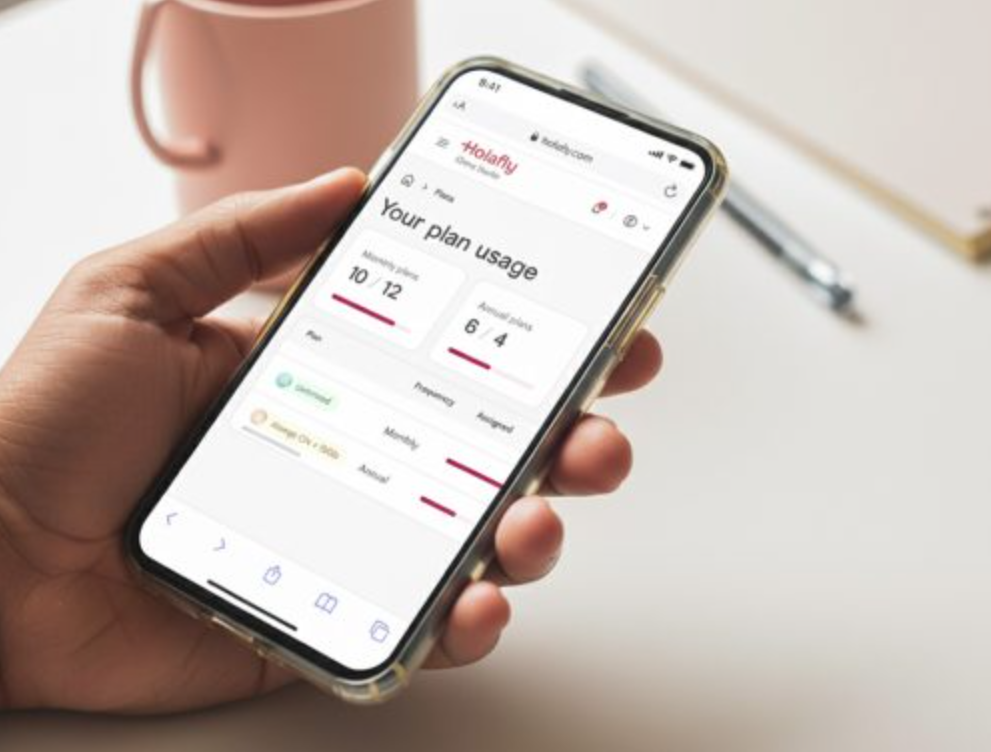
Most SIM cards come in fixed durations – 7 days, 15 days, or 30 days. But what if you’re going away for 12 days? A 15-day plan is too expensive, and a 7-day plan isn’t enough.
One of Holafly’s best features is customizable duration.
Planning a trip for:
- 18 days? Buy 18 days
- 53 days? Buy 53 days
- Just a 1-day layover? Buy 1 day (around $4-7 CAD)
This flexible duration option is incredibly thoughtful and means you never waste money on days you don’t need!
📊 Actual Pricing Example (Japan eSIM):
| Duration | Price (USD) | Daily Average | CAD Estimate |
|---|---|---|---|
| 1 Day | $3.90-$6.90 | $3.90-$6.90/day | ~$5.40-$9.60 |
| 5 Days | $19.50-$20.90 | $3.90-$4.18/day | ~$27-$29 |
| 7 Days | $27.30-$29.90 | $3.90-$4.27/day | ~$38-$42 |
| 10 Days | $36.90 | $3.69/day | ~$51 |
| 20 Days | $61.90 | $3.10/day | ~$86 |
| 30 Days | $74.90 | $2.50/day | ~$104 |
| 90 Days | $139.90 | $1.55/day | ~$195 |
As you can see, the longer your duration, the lower your daily cost. If you’re heading to Japan for 30+ days, the Holafly Plans monthly subscription becomes even better value!
4️⃣ Super Easy Setup – Ready in 5 Minutes
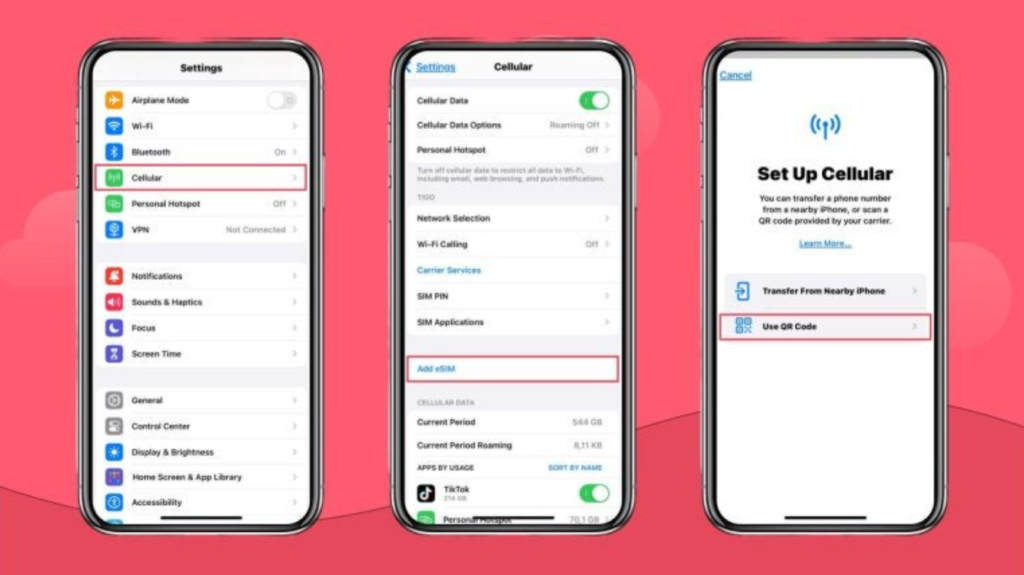
I’ve tested plenty of eSIM services, and some have ridiculously complicated setup processes – you have to enter a bunch of APN codes and manually configure network parameters.
Holafly’s installation is incredibly straightforward:
- Buy your eSIM on their website or app
- Get a QR code via email or WhatsApp
- Scan the QR code
- Tap “Confirm” a few times
- Done!
The whole process takes less than 5 minutes – even my parents (who aren’t super tech-savvy) could do it themselves.
Plus, iPhone users on iOS 17.4 or later have a one-tap installation feature:
- Open the Holafly app
- Select your purchased eSIM
- Tap “Install and Activate”
- Confirm
- Done!
You don’t even need to scan a QR code – the whole process takes just 1 minute, which is ridiculously convenient. This automatic installation feature works perfectly with the iPhone 17 series too.
5️⃣ Install Before You Go, Activate When You Land
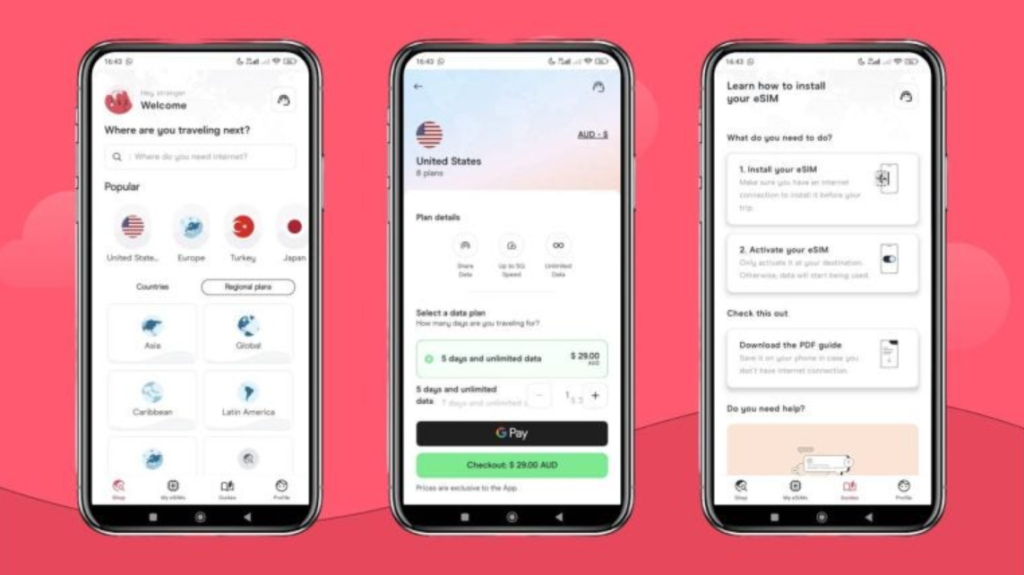
This is one of Holafly’s smartest design features – and a lesson I learned the hard way in Chile.
Here’s what most people don’t realize: you can install your eSIM before you even leave home.
Holafly’s activation system works like this:
- Installing the eSIM ≠ Activating the eSIM
- Your eSIM only starts counting down when you arrive at your destination and turn on data roaming
So now, here’s what I always do:
- Install the eSIM at home a few days before departure (WiFi is more stable, and make sure you’re in a reliable environment. After installing, don’t turn on data roaming for that number yet to avoid accidental connection)
- Turn off your phone or enable airplane mode during the flight
- As soon as you land, turn off airplane mode and enable data roaming for your Holafly eSIM
- Instant internet connection – order an Uber, check maps, or contact your hotel right away (some countries may require manually selecting a carrier or waiting 1-2 minutes for signal; rebooting your phone after landing can speed up the connection)
No more scrambling at the airport or dealing with unreliable airport WiFi.
This feature has saved me multiple times, especially after red-eye flights when I’m too exhausted to deal with anything. If I’d installed my eSIM before landing in Chile back then, I wouldn’t have gotten ripped off by that taxi driver.
⚠️ Pro Tip: Never wait until you’re at the airport to install!
Airport WiFi is often:
- Unreliable connection
- Super slow speeds
- Requires account registration
- You’re rushed and stressed with crowds everywhere
Installing at home means you can take your time, stay calm, and make sure everything’s working properly. Trust me, that’s the way to go.
6️⃣ Keep Your Original Phone Number
One of the best things about using an eSIM is that you can keep your original number active the whole time.
This means:
- ✅ Your WhatsApp, Line, and Telegram numbers stay the same
- ✅ You can still receive SMS verification codes from your bank and credit card (but you need to keep your original SIM “active” with “data roaming turned off”—and note that some carriers may charge roaming fees even for receiving texts)
- ✅ Family and friends can still reach you by phone (there might be international roaming charges, but at least the call will go through)
- ✅ No need to change numbers, and no hassle switching back when you return home
- ✅ All your accounts with linked phone numbers remain unaffected
I used to travel with physical SIM cards, and every time I went abroad, I had to remove my Canadian SIM. One time in Bali, I lost it completely and had to go back to the carrier’s store when I got home to get it replaced. What a pain.
Now with eSIM, those problems are completely gone.
🔧 Setup (Dual SIM Dual Standby):
- Original SIM card: For calls and texts (turn off data roaming to avoid high charges, and make sure “Allow Cellular Data Switching” is disabled)
- Holafly eSIM: For internet (turn on data roaming)
Both cards work at the same time without interfering with each other!
7️⃣ 24/7 Customer Support
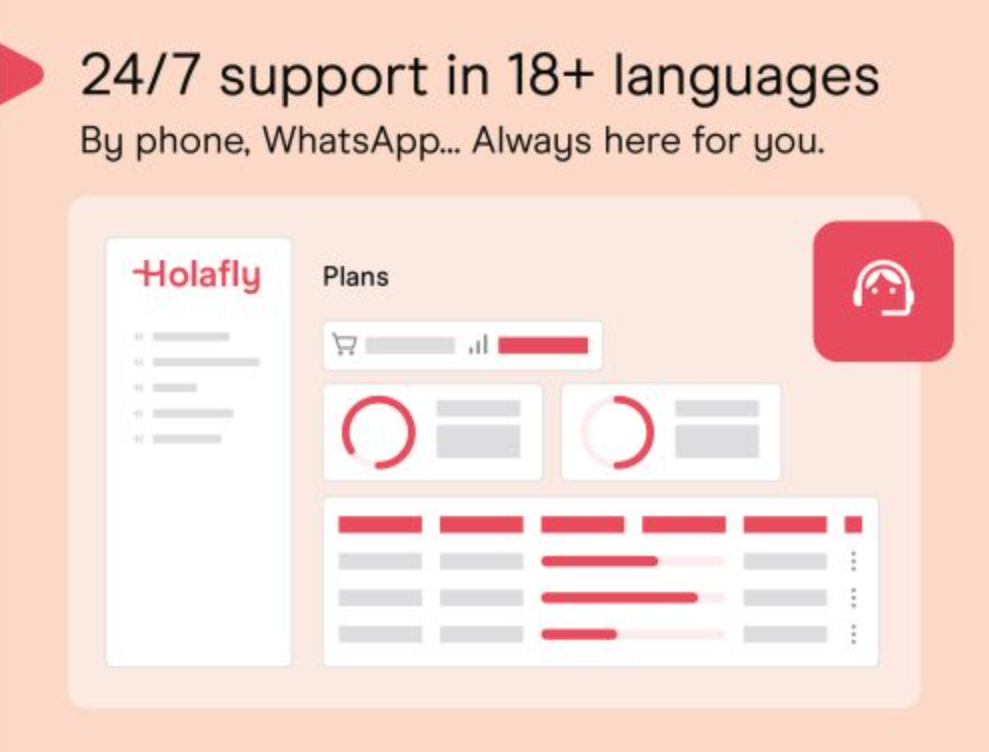
Holafly offers 24-hour customer support with AI assistance backed by real human agents.
I actually tested this myself. Before recording my review video, I randomly messaged their customer service on WhatsApp and here’s what happened:
- They advertise fast responses, but actual wait times vary depending on the situation
- Support system: AI smart routing + human backup (you may need to go through AI customer service for initial troubleshooting)
- Supported languages: Traditional Chinese, English, Japanese, Korean, Spanish, and more
One time I ran into connectivity issues in Da Nang, Vietnam. It was 11 PM and I reached out to Holafly support on WhatsApp. They immediately called me on video and walked me through the solution—super patient. Problem solved in under 5 minutes, and I was back online that same night.
That’s a huge plus in my books!
I’ve tried other eSIM providers where customer service is just a chatbot or email-only support:
- One brand: Chatbot kept sending canned responses, took an hour to reach a real person
- Another brand: Email support only, waited a full day for a reply
- Yet another: Required tons of screenshots, back-and-forth communication took over 3 days to resolve
Holafly’s support channels:
- 📱 WhatsApp: +1-661-384-8482
- 💬 Live chat on website/app
- 📧 Email support
8️⃣ Hotspot Sharing Feature
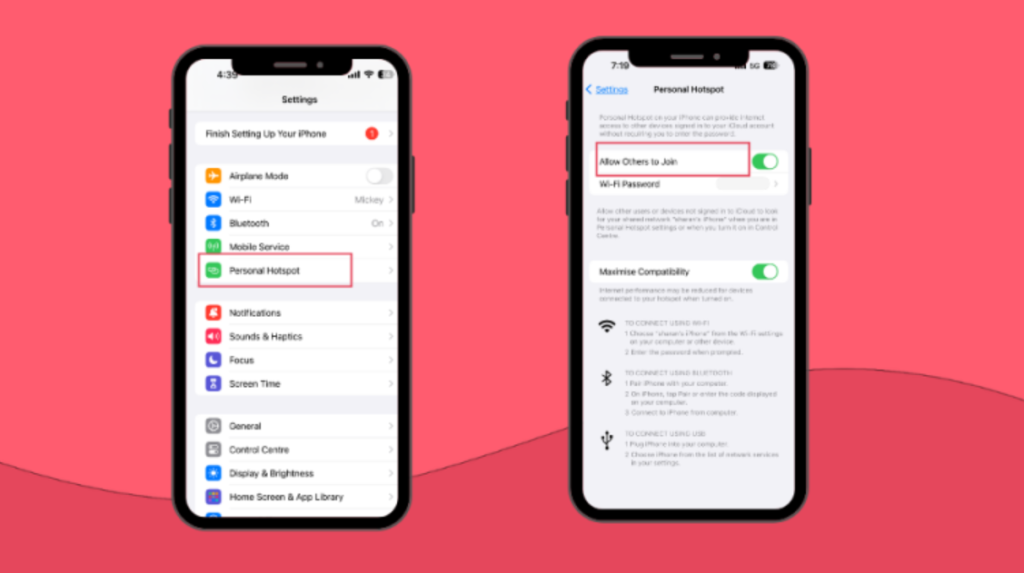
Holafly plans support hotspot sharing, which lets you turn your phone into a mobile WiFi hub and share your connection with other devices.
Hotspot Limits:
| Destination | Daily Hotspot Limit |
|---|---|
| Japan eSIM | 500MB or 1GB/day (depending on plan) |
| Thailand eSIM | 500MB/day |
| Europe eSIM | 1024MB/day (1GB) |
| Holafly Plans Unlimited (monthly subscription) | Unlimited hotspot |
Important Notes:
- Hotspot limits only count “data shared to other devices”
- Your phone’s own data usage is unlimited within reasonable use (subject to fair usage policy)
- Daily limits reset at midnight (destination time zone)
🌟 Practical Scenarios:
- Sharing internet with friends or family: Travelling with your partner? Just buy one Holafly eSIM and share the hotspot with them—both of you get online and you save some cash.
- Need internet for your laptop: Digital nomads using the Holafly Plans Unlimited monthly subscription can connect their laptop to the hotspot for video calls and file uploads with unlimited sharing.
- Kids’ tablets need internet: When travelling with the family, turn on hotspot sharing so the kids’ iPads can stream cartoons.
- Emergency backup: One time in Cambodia, I was in a tuk-tuk and the driver had no internet for navigation. I turned on my hotspot for him to connect and use Google Maps, and we got to the destination without any issues. Problem solved in seconds!
9️⃣ 6-Month Money-Back Guarantee
Holafly offers a 6-month refund policy, which is extremely rare in this industry!
Refund Conditions:
- You can request a refund within 6 months of purchase
- Only if the eSIM has not been activated or used (once the eSIM is activated, you cannot get a full refund simply for changing your mind)
- Processing time: Once the refund is approved, funds will be returned to the original payment account within 10 to 14 business days
- Refund method: Returned via original payment method
Applicable Situations:
- Last-minute trip cancellations (must be requested before the eSIM is installed or activated)
- Visa application rejected
- Your phone doesn’t support eSIM (didn’t check before buying)
- Issues with Holafly or network infrastructure preventing use
- Simply changed your mind (as long as it hasn’t been activated)
🎯 Real Case: A traveller had planned a trip to India and bought a Holafly eSIM in advance. But due to tensions between the Canadian and Indian governments, their visa kept getting delayed and eventually the trip was cancelled. They applied for a refund and received their full refund within 10 to 14 business days—no hassle whatsoever.
This policy gives you complete peace of mind. You don’t have to worry about “what if I buy it and can’t use it?”
🔟 Always On – Free 1GB Forever
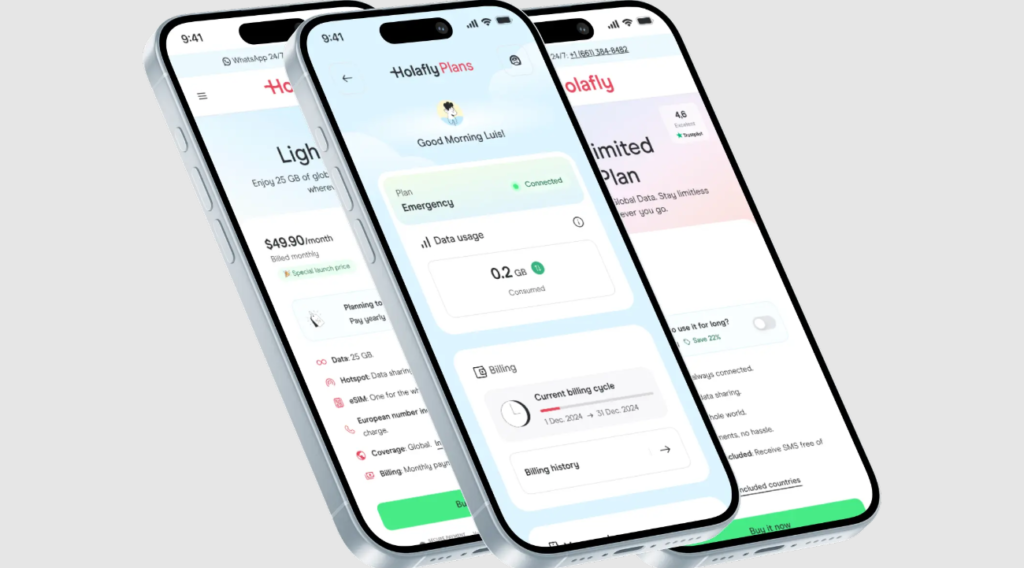
This is an amazing feature Holafly launched on November 4, 2025. I think it’s the most innovative service in the industry!
What is Always On?
- Who it’s for: Holafly Plans subscribers (Light and Unlimited plans) (Note: Only subscription users qualify—single-purchase prepaid eSIMs are not eligible)
- What you get: After your subscription ends or is paused, you automatically receive 1GB of free data each month
- Coverage: 76 countries (covering major travel destinations in Europe, Americas, Asia, Australia, but fewer than the main plan’s 170+ countries)
- Validity: Never expires as long as you use it once every 12 months
- Cost: Completely free
What can you do with 1GB?
| Activity | Usage Time |
|---|---|
| Instagram browsing | About 1 hour |
| Google Maps navigation | About 10 hours |
| WhatsApp text chat | About 34 hours |
| Sending/receiving emails | Hundreds of emails |
| Calling an Uber/Grab | Dozens of times |
🌟 Real-World Scenario: A traveller flew from Nepal to Colombia with a layover in Panama. They hadn’t purchased a Panama eSIM and were worried about being offline during the connection.
But thanks to Holafly’s Always On feature, their phone automatically connected to the internet when they landed in Panama, allowing them to:
- Notify family about the flight delay
- Rebook their hotel
- Check the gate for their connecting flight
- Call an Uber to grab food in the city (they had a long layover)
All without paying a cent!
💡 The Value of This Feature: It’s essentially a “permanent backup connection.” Even if you’re not travelling, as long as you use it once a year, you’ll have 1GB of emergency data in 76 countries worldwide. For frequent travellers, this is like free “travel insurance.”
💰 Complete Breakdown of Plans & Pricing
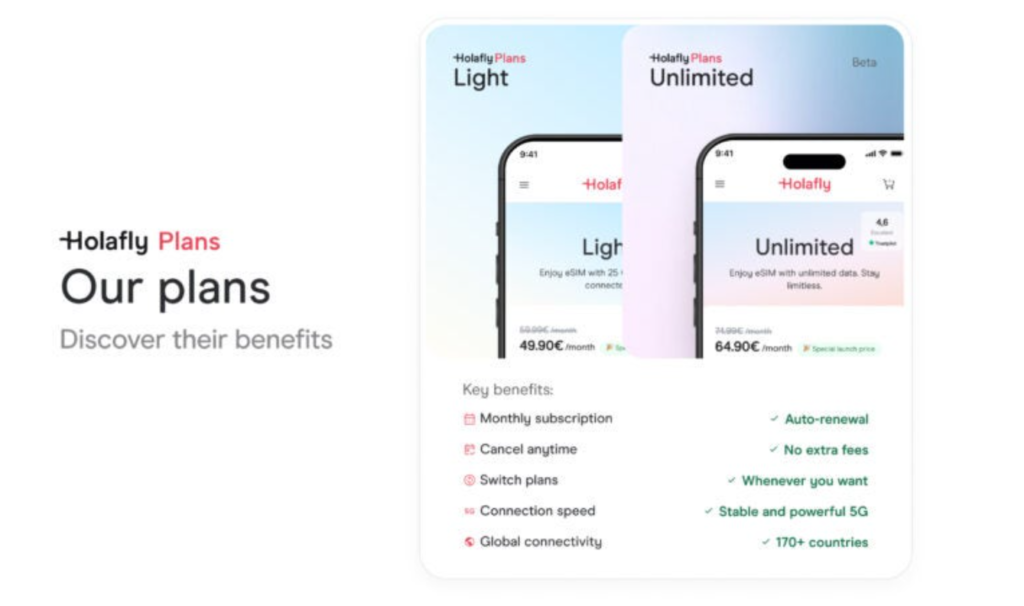
Holafly offers two main types of plans: Destination eSIMs and Holafly Plans Subscriptions.
📍 Option 1: Destination eSIM (Perfect for Short Trips)
🇯🇵 Japan eSIM Pricing (Unlimited Data)
| Days | Price (USD) | Daily Cost | CAD Estimate |
|---|---|---|---|
| 1 Day | $6.90 | $6.90/day | ~$9.50 CAD |
| 5 Days | $19.50 | $3.90/day | ~$27 CAD |
| 7 Days | $27.30 | $3.90/day | ~$38 CAD |
| 10 Days | $36.90 | $3.69/day | ~$51 CAD |
| 20 Days | $61.90 | $3.10/day | ~$85 CAD |
| 30 Days | $74.90 | $2.50/day | ~$103 CAD |
| 90 Days | $139.90 | $1.55/day | ~$193 CAD |
Network Provider: KDDI (au) / SoftBank (dual network coverage with automatic switching based on signal strength)
Hotspot Sharing: Japan plans typically allow up to 500MB daily hotspot limit
🇪🇺 Europe eSIM Pricing (40+ Countries, Unlimited Data)
| Days | Price (USD) | Daily Cost | CAD Estimate |
|---|---|---|---|
| 5 Days | $19.50 | $3.90/day | ~$27 CAD |
| 7 Days | $27.30 | $3.90/day | ~$38 CAD |
| 10 Days | $36.90 | $3.69/day | ~$51 CAD |
| 20 Days | $61.90 | $3.10/day | ~$85 CAD |
| 30 Days | $74.90 | $2.50/day | ~$103 CAD |
Coverage Countries: Germany, France, Italy, Spain, UK, Switzerland, Netherlands, Austria, Belgium, Greece, Portugal, Czech Republic, Poland, Hungary, Croatia, and 40+ countries (Ukraine and Moldova have now joined the EU free roaming zone)
Hotspot Limit: 1024MB (1GB) daily
🇹🇭 Thailand eSIM Pricing (Unlimited Data)
| Days | Price (USD) | Daily Cost | CAD Estimate |
|---|---|---|---|
| 5 Days | $19.50 | $3.90/day | ~$27 CAD |
| 10 Days | $36.90 | $3.69/day | ~$51 CAD |
| 30 Days | $74.90 | $2.50/day | ~$103 CAD |
Network Provider: TrueMove H (True Corp) / dtac (both networks have merged, sharing network resources for the widest coverage across Thailand)
🇺🇸 USA eSIM Pricing (Unlimited Data)
| Days | Price (USD) | CAD Estimate |
|---|---|---|
| 5 Days | ~$19.50 | ~$27 CAD |
| 7 Days | ~$27.30 | ~$38 CAD |
| 30 Days | $74.90 | ~$103 CAD |
Network Provider: AT&T / T-Mobile (dual network coverage across all 50 states)
🌍 Option 2: Holafly Plans Monthly Subscription (Perfect for Long-Term Travel/Digital Nomads)
| Plan Name | Monthly Data | Monthly Fee (USD) | Features | Best For |
|---|---|---|---|---|
| Emergency | 1GB/month | $3.65 (one-time) | Basic backup connection | Emergency backup |
| Light | 25GB/month | $49.90 (monthly) $39 (annual) | Includes hotspot sharing | Light users |
| Unlimited | Unlimited data | $64.90 (monthly) $50 (annual) | Unlimited hotspot + European phone number | Heavy users/digital nomads |
Global Coverage: Over 170 countries and regions, one eSIM works everywhere
Annual Savings: Save 22%
Always On: Free 1GB monthly after subscription ends (available in 76 countries)
💸 Price Economics: ROI Analysis
Let’s crunch the numbers and see if Holafly is actually worth it.
Traditional Carrier Roaming (Canadian examples):
- Rogers: Around $12-15 CAD per day
- Bell: Approximately $12-14 CAD per day (Europe)
- Telus: About $12-16 CAD per day (promotional rates may apply)
For a 10-day European trip:
- Roaming fees: $120-160 CAD (and you might still have data caps)
- Holafly eSIM: Around $51-55 CAD (unlimited data)
- You save: $65-105 CAD
That price difference is honestly wild—you can save 40%-60% or more by using Holafly.
🌏 Real-World Testing: My Personal Experience
I’ve used Holafly in tons of countries over the past few years, and every experience has been stellar. Here are some of my most memorable trips:
🇹🇭 Thailand’s Chiang Mai Mountains: Signal Even in Remote Areas
Last year, I spent a week near Chiang Dao in the mountains outside Chiang Mai. This place is seriously remote—even locals mentioned that cell reception can be sketchy up there.
But my Holafly eSIM (running on TrueMove H network) had signal the entire time! Sure, it would sometimes drop from 5G to 4G, but the speeds were still solid enough to:
- Navigate smoothly with Google Maps
- Message friends back home
- Post Instagram stories
My travel buddy had a different eSIM provider, and their phone literally had no signal in the mountains. They ended up borrowing my hotspot the whole trip 😂
🇯🇵 Tokyo, Japan: Blazing-Fast 5G
Using Holafly in Tokyo was absolutely incredible!
Speed test results (on KDDI and SoftBank networks):
- Tokyo city centre (Shinjuku, Shibuya, Asakusa): Download 80-120 Mbps, Upload 20-40 Mbps
- Osaka city centre: Download 60-100 Mbps
- Rural Hokkaido (Biei, Furano): Download 20-50 Mbps
The 5G speeds were insane—downloading apps and streaming 4K YouTube videos with zero lag. Plus, unlike the old pocket WiFi days, I had signal throughout the entire Tokyo subway system. No more dead zones underground.
Signal on the Shinkansen (bullet train) was excellent too. You’ll get occasional drops in tunnels (that’s normal for any provider), but overall coverage was solid.
🇻🇳 Vietnam Cross-Border Journey: One eSIM Across Southeast Asia
Last year I took a bus from Bangkok, Thailand all the way to Hanoi, Vietnam, passing through the Laos border.
I bought the Holafly Asia Regional eSIM, so:
- Thailand → Laos (using LTC network) → Vietnam
- Never had to swap SIM cards
- Network switched automatically
Going through customs, my phone automatically connected to the new carrier. Completely seamless. This experience was genuinely mind-blowing!
I also visited:
- Angkor Wat, Cambodia
- Ubud, Bali
- Singapore
- Kuala Lumpur, Malaysia
- Sri Lanka (full island tour)
One eSIM for the entire journey—super convenient.
🇺🇸 Alaska, USA: Signal Even in the Wilderness
My friend went on an Alaska road trip last month and was worried about having no signal in remote areas.
Turns out Holafly performed way better than expected:
- In major towns and along highways (like Anchorage and Fairbanks), there was solid 4G LTE and 5G coverage
- Holafly uses AT&T’s network, which has some of the best coverage in the region
- Good enough for navigation and messaging
He said without Holafly, he wouldn’t have dared to drive around Alaska freely because:
- You can go miles without seeing another soul
- Getting lost could be seriously dangerous
- Internet access is a critical safety tool
Important reminder: In Alaska’s true wilderness areas off main highways, you may have zero signal. It’s smart to download offline maps and consider renting satellite communication devices (like Garmin inReach or satellite-enabled smartphones) as backup.
With Holafly, he could:
- Check his location anytime
- Find the nearest gas station
- Call for help in emergencies
In areas with coverage, internet access is a safety lifeline.
🇪🇺 Europe Multi-Country: The Ultimate Cross-Border Travel Tool
Europe is seriously Holafly’s sweet spot!
I used one Europe eSIM across 8 different countries:
- 🇫🇷 Paris, France
- 🇮🇹 Rome and Florence, Italy
- 🇨🇭 Zurich, Switzerland
- 🇦🇹 Vienna, Austria
- 🇩🇪 Munich, Germany
- 🇨🇿 Prague, Czech Republic
- 🇭🇺 Budapest, Hungary
- 🇭🇷 Dubrovnik, Croatia
Cross-border experience:
- Took the train from Austria to Germany—network switched automatically
- Signal stayed strong in border towns (Austria-Germany border)
- Used Google Maps navigation continuously on highways without any interruptions
- Drove from Germany to Switzerland—border transition was smooth
- Swiss Alps had great reception, mainly connecting to widely-covered low-band 4G/5G signals
Seamless network switching throughout the entire trip with zero management required. So incredibly convenient.
Holafly offers one of the rare truly unlimited data plans on the market, perfect for heavy navigation and social media users. However, it’s important to note that while your phone gets unlimited data, hotspot sharing is typically limited to 500MB to 1GB daily. If you need to work on a laptop, definitely keep this in mind.
🇨🇳 China Special: The Built-In VPN Game Changer
This might be Holafly’s most powerful “hidden feature”!
As we all know, China enforces strict internet censorship (the Great Firewall), blocking access to:
- Google, Gmail
- Facebook, Instagram, WhatsApp
- YouTube
- Line
The traditional workaround? Buy a local SIM card + download a VPN app.
But here’s the problem: many VPNs frequently fail in China, with incredibly unreliable connections.
Holafly’s China eSIM uses cross-border roaming technology to route your data through Hong Kong or Singapore, physically bypassing the Great Firewall. This is way more stable and battery-efficient than VPN apps you need to install on your phone.
Real-world test results:
- In Shanghai, Beijing, and even remote areas of Yunnan
- Users don’t need to turn on any VPN software
- Just use Holafly’s data connection
- And you can smoothly browse Instagram, send and receive Gmail, and watch YouTube videos
Holafly primarily connects to China Mobile’s network in China, which has the widest coverage of any carrier in the country. This means you’ll get significantly better service in remote areas compared to other options.
Key advantages:
- ✅ Saves you the monthly VPN subscription fee (usually $5-15 USD/month)
- ✅ Eliminates the anxiety of VPN connection failures
- ✅ No worries about getting caught using a VPN
For business travellers or heavy social media users, this is hands-down the most hassle-free internet solution for entering China.
🏝️ Cambodian Islands & Sri Lankan Jungles: Staying Connected Where Infrastructure Falls Short
In regions with poor infrastructure, Holafly’s performance is seriously impressive.
The Cambodian island experience:
One traveller got stuck on a small island in Cambodia. They initially used an Airalo eSIM that was locked to a single carrier. The result?
- Great signal on one side of the island
- But absolutely no signal on the other side (where they were staying)
This left them completely disconnected for half their time on the island.
They eventually switched to Holafly because Holafly supports all three major carriers in Cambodia: Smart Axiata, Metfone (Viettel), and CamGSM, allowing them to stay connected across the entire island. Metfone, operated by Vietnam’s Viettel, has particularly strong coverage in coastal and jungle areas.
This “signal redundancy” design is especially crucial when travelling to developing countries with uneven infrastructure.
The Sri Lankan jungle experience:
During a month-long tuk-tuk journey around the island, Google Maps was the only guide. The reviewer ventured deep into remote national parks, kilometres away from any sign of civilization, but Holafly’s signal still allowed them to confirm their location, preventing them from getting lost in the jungle. Holafly uses Dialog’s network in Sri Lanka, which is the country’s top carrier for coverage, with performance in remote areas that far exceeds other providers.
🏔️ Pakistani Mountains: The Fear of Being Offline
Another group of travellers shared that if they’d had Holafly earlier, they wouldn’t have been cut off from the world for two days in the Pakistani mountains while trying to find a physical SIM card shop.
That feeling of “if something happens, no one will know where I am” is one of the biggest psychological stresses of travelling. Holafly connects to CMPak (Zong) in Pakistan, which is China Mobile’s subsidiary in the country and has the strongest coverage in the northern mountains and along the Karakoram Highway.
Internet isn’t just convenient—it’s a safety net.
📲 Step-by-Step Installation Guide
A lot of folks get a bit nervous using eSIM for the first time, worried they’ll mess something up. Don’t sweat it—I’ve broken down the entire process into super detailed steps to make sure you nail it on the first try!
✅ Step 1: Confirm Your Phone Supports eSIM
Before you buy anything, you absolutely need to check whether your phone supports eSIM.
Quick check method:
- Dial
*#06# - If an EID code appears, your phone supports eSIM
- If you only see an IMEI, it doesn’t support eSIM
Common eSIM-compatible models:
📱 iPhone:
- iPhone XS, XR, and all newer models
- Including iPhone 11, 12, 13, 14, 15, 16, 17 series
📱 Android:
- Google Pixel 2 and newer (the latest Pixel 10 series US version has switched to eSIM-only design)
- Samsung Galaxy S20 and newer (international version—most Taiwan versions don’t support it ⚠️)
- Huawei P40 and newer (verify it’s not carrier-locked)
- Select newer Oppo, Sony, and Motorola models
- Xiaomi 12T Pro, 13 series, 14 series
Important notes:
- ⚠️ Most Taiwan-sold Samsung phones don’t support eSIM (this is Samsung Taiwan’s policy)—including the latest Galaxy S24 and S25 series Taiwan versions. Before buying, make sure to go to “Settings > Connections > SIM Manager” to confirm whether you have an “Add eSIM” option
- ⚠️ Mainland China iPhones don’t support eSIM (except for the iPhone 17 Air model A3518, which is the first iPhone to support eSIM in China)
- ⚠️ US iPhones from iPhone 14 onwards have removed the physical SIM card slot and only support eSIM
- ✅ Your phone must be an unlocked version—if it’s a carrier-locked contract phone, you might not be able to use eSIM
✅ Step 2: Purchase Your Holafly eSIM
- Head to the Holafly website or download the Holafly app
- Select your destination country or region
- Choose your duration (1-90 days)
- Add to cart
- Enter promo code: At checkout, enter MYESIMNOW5 or ADAMANDLINDS to get 5% off!
- Complete payment (supports credit card, Apple Pay, Google Pay, PayPal)
✅ Step 3: Receive Your QR Code
After payment is complete, you’ll receive your QR code within seconds through one of these methods:
- 📱 WhatsApp (sent automatically—super instant and convenient)
- 📲 Inside the Holafly app
Pro tip: If you have multiple devices (like a laptop and phone), screenshot the QR code for easy scanning.
✅ Step 4: Install Your eSIM
There are 3 installation methods, with the app’s one-tap install being the most convenient:
🔹 Method 1: Scan the QR Code (Most Recommended)
For iPhone users:
- Open “Settings” → “Cellular” or “Mobile Data“
- Tap “Add eSIM“
- Select “Use QR Code” (on iOS 26, you can also just open the Camera app and scan the QR code directly—the system will automatically guide you to the eSIM setup page without needing to go through the menu first)
- Scan the QR code Holafly sent you
- Tap “Continue“
- Wait a few minutes until you see “Cellular Plan Ready” (if you see a “Travel eSIM” prompt, select “Continue”—this will keep your primary number for iMessage and enable automatic switching)
- Tap “Done“
For Android users:
Google Pixel (Android 16):
- Open “Settings” → “Network & Internet” → “SIMs“
- Tap “Add SIM“
- Select “Download eSIM” or “Scan provider’s QR code“
- Scan the QR code
- Confirm and activate
Samsung (One UI 8):
- Open “Settings” → “Connections” → “SIM Manager“
- Tap “Add eSIM“
- Select “Scan provider’s QR code“
- Scan the QR code
- Confirm and activate
🔹 Method 2: Manual Entry (If QR Code Won’t Scan)
If the QR code won’t scan, you can manually enter the activation code:
- On the “Add eSIM” screen, select “Enter Details Manually“
- Copy and paste the activation code provided in your Holafly email
- Follow the instructions to complete setup
🔹 Method 3: App Auto-Install (Recommended for iOS 26 / iPhone 17 and Android Users)
If your iPhone is running iOS 17.4 or newer (including iOS 26), or you’re using a supported Android phone, you can use the super simple one-tap installation:
- Open the Holafly app
- Tap on your purchased eSIM
- Click “Install and Activate“
- Confirm
- Done!
✅ Step 5: Label Your eSIM (Makes Life Easier)
Once installation is complete, I highly recommend renaming your eSIM—it makes managing multiple lines so much simpler.
For example:
- Your original line: “Canada – Rogers” or “Taiwan – Chunghwa Telecom“
- Holafly eSIM: “Japan Travel” or “Holafly – Europe” (iOS 26 may automatically suggest a “Travel” label, which helps the system manage roaming settings automatically)
This way, you’ll know which is which at a glance.
✅ Step 6: Activate Your eSIM
Important: Your eSIM won’t start counting down immediately after installation—it only activates when you turn on “Data Roaming.”
So you can:
- Install the eSIM before you leave (WiFi at home is way more stable. I strongly recommend installing it 1 day before departure. For iOS 26 users, the eSIM will stay in standby mode and automatically connect once it detects the local network at your destination)
- Keep airplane mode on during the flight
- Turn on “Data Roaming” for your Holafly eSIM only after you land
How to enable Data Roaming:
- Open “Settings” → “Cellular” (or “Mobile Data“)
- Select your Holafly eSIM
- Toggle “Data Roaming” on
⚠️ Critical Reminder: Make sure to turn OFF “Data Roaming” on your Canadian/home line to avoid insane roaming charges!
✅ Step 7: Confirm Your Connection
After enabling Data Roaming, wait 1-5 minutes for your phone to automatically connect to the local network.
You’ll see:
- Signal bars change from “No Service” to showing signal strength
- The local carrier name appears (e.g., in Japan you’ll typically see KDDI (au) or SoftBank, in Europe it might be Orange/Vodafone, etc. Currently, Holafly primarily connects to these two carriers, so don’t panic if you don’t see DoCoMo—that’s totally normal)
- You can browse the internet normally
If it’s been more than 10 minutes and you’re still not connected, try:
- 🔄 Restart your phone
- ✈️ Toggle airplane mode on and off
- 📶 Check that “Network Selection” is set to “Automatic”
- 💬 Contact Holafly support (24/7 live chat available. Use the WhatsApp integration in the Holafly App—it’s the fastest way to get 24/7 help)
🔧 Troubleshooting: What to Do When Your Connection Won’t Work
Common Issues & Solutions:
| Error Message | Cause | Solution |
|---|---|---|
| Unable to Complete Cellular Plan Change | QR code already used, carrier lock on device, or eSIM slots full | Check if your phone has a carrier lock (Settings > About), confirm you haven’t installed too many eSIMs, or contact support for a new code |
| Cellular Plan Not Available | eSIM already used or activation code expired | Try manually entering the SM-DP+ address and activation code, or contact Holafly 24/7 support |
| No Service | Data Roaming not enabled, incorrect APN settings, or network selection issue | Confirm Data Roaming is on, check APN settings, or manually select KDDI/SoftBank network |
| SIM Not Provisioned | eSIM not activated yet or backend activation failed | Normal if installing at home; if you still see this message after arriving in Japan, contact support immediately—you may need a replacement card |
90% of connection issues are simply because people forgot to turn on “Data Roaming.”
⚠️ Honest Review: 4 Potential Drawbacks
As an objective review, I need to be upfront about Holafly’s limitations. There’s no perfect product—only the right product for you.
❌ Drawback 1: Daily Hotspot Limit (Unless You Use the Plans Option)
The Restriction:
- Standard destination eSIM: 500MB daily hotspot limit
- After hitting the limit: You can’t share anymore, but your phone itself continues working normally
Who’s affected?
- Group travellers who need heavy hotspot sharing
- Digital nomads who need laptop connectivity for extended work sessions
- Families wanting to share the connection with multiple people
Solutions:
- Upgrade to Holafly Plans Unlimited ($64.90/month) with unlimited hotspot
- For group travel, consider renting a WiFi hotspot device
- Light users (just occasional map sharing) will find 500MB plenty
❌ Drawback 2: Data Only—No Voice Calls
Real-world impact:
- You can’t make traditional phone calls using the Holafly eSIM
- You can’t receive traditional calls (the Japan eSIM doesn’t provide a +81 number)
Workarounds:
- Use WhatsApp, Line, or WeChat for calls (completely free)
- Use FaceTime Audio or Messenger for voice calls
- If you need to receive SMS verification codes, keep your original SIM active (dual SIM setup)
- Holafly Plans includes a European phone number (can receive SMS)
🎯 My Take: Honestly, most people use WhatsApp or Line these days—I rarely need traditional phone calls. When I occasionally need to receive a bank SMS verification code, I just temporarily switch to my original SIM to grab it. Super convenient.
❌ Drawback 3: Slightly Pricier Than Data-Cap Plans
Price Comparison (7-day Japan example):
| Brand | Plan Type | Price | Daily Cost |
|---|---|---|---|
| Holafly | Unlimited data | ~$27.30 | $3.90/day |
| Airalo | 10GB data | ~$18 | $2.57/day |
| Ubigi | 10GB data | ~$17 | $2.43/day |
Who might find it expensive?
- Light users (just checking maps and sending messages)
- Budget-conscious backpackers
Who’ll find it worth every penny?
- Heavy users (social media, YouTube, remote work)
- Anyone who doesn’t want to stress about running out of data
- Content creators uploading tons of photos/videos
💡 Cost-Benefit Analysis: If you’re a heavy user, a 5GB plan might run out in 3 days, forcing you to buy more data—and the total cost could actually exceed Holafly’s price. The real value of unlimited data is peace of mind.
❌ Drawback 4: Taiwan-Version Samsung Phones Don’t Support eSIM
Unsupported devices:
- ⚠️ Samsung Galaxy series sold in Taiwan (including the latest Galaxy S25 / S25+ / S25 Ultra) do NOT support eSIM—they only have physical dual SIM slots
- ⚠️ iPhones sold in mainland China (standard/Pro models) don’t support eSIM (physical dual SIM only). The exception is the iPhone 17 Air (Slim), which has a full eSIM design and supports China Unicom eSIM service
How to check if your phone supports eSIM:
- Dial
*#06# - If you see an EID number, your phone supports eSIM
- If you only see IMEI numbers, it doesn’t support eSIM
Common eSIM-compatible models:
- ✅ iPhone XS / XR and newer (Taiwan versions supported, including iPhone 16, 17 series. Note: US versions of iPhone 14 and newer are eSIM-only with no physical SIM slot)
- ✅ Google Pixel 4 and newer (Pixel 2/3 have inconsistent support—recommend Pixel 4+. Includes Pixel 9, Pixel 10 Pro Fold)
- ❌ Samsung Galaxy S20 through S25 Ultra entire lineup (Taiwan versions completely lack eSIM support; only Europe/US/Japan/Korea/international versions support it)
- ✅ Xiaomi 12T Pro, 13, 14, 15 / 15 Pro / 15 Ultra series (must be international/global version, China versions don’t support eSIM)
- ✅ OPPO Find X3/X5 Pro, Find N3 Flip, Find X8 / X8 Pro
Solutions:
- Check phone compatibility before purchasing (Holafly’s website has a complete compatibility list)
- If your phone doesn’t support eSIM, consider traditional SIM cards or WiFi hotspot devices
🆚 Holafly vs Other Brands Comparison
To help you make the most informed decision, I’ve put together this detailed comparison chart.
Holafly vs Airalo | Unlimited Data (with FUP) vs Fixed Data Plans

| Comparison | Holafly | Airalo |
|---|---|---|
| Data Type | Unlimited data (subject to FUP limits, approx. 2GB-3GB high-speed data per day, then throttled—specific thresholds vary by country) | Fixed data (1GB-20GB) |
| Pricing | Higher price point (but offers monthly subscription at $64.90/month, great for long-term travellers) | More budget-friendly |
| Coverage | 200+ countries | 200+ countries |
| Hotspot Sharing | Depends on plan: Single-trip plans limited to 500MB-1GB per day; Monthly subscription (Holafly Plans) supports unlimited hotspot sharing | Supported |
| Customer Support | 24/7 live human support (lightning-fast response, average <30 seconds) | AI chatbot + ticket system (slower human response, usually takes several hours) |
| Refund Policy | Refunds within 6 months | Strict restrictions (only for technical failures unresolved within 24hrs; “change of mind” refunds not supported) |
| Best For | Heavy data users | Light users/budget-conscious travellers |
My Recommendation:
- ✅ Go with Holafly: If you’re a heavy user who doesn’t want to worry about running out of data
- ✅ Go with Airalo: If you’re a light user looking to save money
Holafly vs DJB/Verizon | International Brand vs Local Taiwanese Provider

| Comparison | Holafly | DJB/Verizon |
|---|---|---|
| Native Network | Hybrid model (uses high-quality roaming or native networks in popular regions like China/Japan; China plans include built-in VPN, no need for separate VPN setup) | Focuses on native networks (e.g., Japan’s Docomo/Softbank direct connection, ultra-low ping, ideal for gaming/ticket booking) |
| Pricing | Mid-range | Higher |
| Purchase Channel | Buy online, use instantly | Buy online |
| Customer Support Language | Traditional Chinese | Traditional Chinese |
| Brand Trust | International brand (10 million users) | Taiwanese brand (recommended on PTT) |
My Recommendation:
- ✅ Go with Holafly: If you value global coverage, unlimited data, and an established international brand
- ✅ Go with DJB/Verizon: If you’re only travelling to Japan and want a native SIM card (though it’s pricier)
Complete Comparison Table
| Feature | Holafly | Airalo | Nomad | Local Physical SIM |
|---|---|---|---|---|
| Main Selling Point | Unlimited data | Budget-friendly, flexible | User-friendly interface, mid-range pricing | Local networks, voice calls included |
| Data Limits | Unlimited data (FUP hidden threshold ~2GB-3GB/day then throttled, resets daily) | Fixed (1GB – 20GB) | Fixed / rarely unlimited | Depends on plan |
| Hotspot Sharing | Limited (500MB-1GB per day) | Supported (deducts from total data) | Supported (depends on plan) | Usually supported |
| Price Point | Premium | Budget | Mid-range | Varies by country (airport kiosks typically more expensive) |
| Setup Difficulty | ⭐⭐⭐⭐⭐ (super easy) | ⭐⭐⭐⭐ | ⭐⭐⭐ | ⭐⭐ (requires queuing to swap SIM) |
| China VPN | Built-in VPN (reliable) | Need separate VPN | Need separate VPN | Need separate VPN |
| Best For | Heavy users, convenience-seekers, seniors | Light users, budget travellers | Flexible needs | Long-term stays, need voice calls |
| Customer Support Response | Lightning fast (instant human support) | Slow (ticket system) | Average | Varies by store |
❓ 20 Most Common FAQs
What is an eSIM? How is it different from a physical SIM card?
An eSIM (Embedded SIM) is a digital SIM card that’s built into your device—no physical card needed.
Main differences:
- Physical SIM card: Needs to be inserted into your phone, easy to lose, hassle to swap
- eSIM: Downloaded via QR code, completely digital, can’t be lost
Does my phone support eSIM?
Quick check method:
- Dial
*#06# - If an EID code appears, your phone supports eSIM
- If only IMEI shows up, eSIM is not supported
Common compatible models:
- ✅ iPhone XS / XR and newer models (including iPhone 16 / 17 series)
- ✅ Google Pixel 2 and newer models
- ❌ Samsung Galaxy S20 / S24 / S25 and newer models (International versions support eSIM, most Taiwan versions do not)
Do Taiwan-sold Samsung phones support eSIM?
❌ Nope!
Most Samsung Galaxy series sold in Taiwan (S20, S21, S22, S23, S24, S25, etc.) don’t support eSIM—this is Samsung Taiwan’s policy.
Solutions:
- Check with
*#06#before purchasing - If not supported, consider using a physical SIM card or WiFi hotspot device
Can I use eSIM alongside my original SIM card?
✅ Absolutely! This is called “dual SIM dual standby” functionality.
How it works:
- Keep your original SIM card in the phone (for calls and texts)
- Use Holafly eSIM for data
- Both cards work simultaneously without interfering with each other
When does the eSIM countdown start?
The countdown starts from “activation,” not “installation.”
- Installing eSIM: Can be done before departure, won’t start the countdown
- Activating eSIM: Once you arrive at your destination and turn on “data roaming,” the countdown begins
💡 Pro tip: Install it before you leave, then turn on data roaming when you land—instant connectivity!
Can I reinstall an eSIM after deleting it?
It depends:
Holafly Standard eSIM:
- ❌ Cannot be reinstalled after deletion
- If deleted by mistake, contact customer support for a new code
Holafly Plans Subscription:
- ✅ Can be transferred to a new device once
- Need to contact customer support for assistance
💡 Pro tip: Only delete after your trip is done—don’t delete mid-journey.
How much does Holafly cost? Is it worth it?
Price range (7-day example):
- Japan: ~$27.30 (approx. NT$820)
- Europe: ~$27.30 (covers 40+ countries)
- Thailand: ~$27.30
- USA: ~$27.30
Is it worth it?
- Compared to international roaming ($10-15 USD/day): ✅ Great value
- Compared to data-capped eSIMs (5GB for ~$13): Pricier, but unlimited data gives you peace of mind
- Compared to physical SIM cards: Similar price, but eSIM is way more convenient
Does Holafly have discount codes?
✅ Yes!
Use my exclusive referral link: https://holafly.go.link/frAhZ
What you get:
- First purchase: 5% discount
- Every purchase: 5-7% HolaCoins cashback
- Refer a friend: Earn $5-7 USD in rewards
Can I get a refund from Holafly?
✅ Yes! And they’re super generous about it.
Refund conditions:
- Within 6 months of purchase
- eSIM has not been activated or used
- Processing time: 10-14 business days
Valid scenarios:
- Trip cancelled
- Visa denied
- Phone doesn’t support eSIM
- Holafly network not working
Does Holafly have hidden fees?
✅ Absolutely none!
- ✅ No roaming fees
- ✅ No overage charges
- ✅ No hidden costs
The price you see at checkout is your final price.
Does Holafly’s Unlimited Data Really Stay at Full Speed?
✅ Yes, they offer high-speed unlimited data, but it’s subject to a fair use policy.
Fair Use Policy Details:
- After exceeding 90GB in a month, speeds may be throttled to 256-1024 KB
- Throttling period: Up to 24 hours maximum
- Returns to normal speed afterwards
Real-World Testing:
- Used 3-5GB daily for 30 consecutive days (total: 90-150GB)
- Zero throttling experienced
- Speeds consistently stayed between 40-100 Mbps
💡 Bottom Line: Unless you’re binge-watching 4K videos all day, you won’t need to worry about throttling.
Can I Use Holafly as a Hotspot?
✅ Yes! But there are daily limits.
| Plan Type | Daily Hotspot Limit |
|---|---|
| Japan eSIM | 500MB/day |
| Thailand eSIM | 500MB/day |
| Europe eSIM | 1024MB/day (1GB) |
| Holafly Plans Unlimited | Unlimited Hotspot |
Important Note:
- Hotspot limits only count “data shared with other devices”
- Your phone’s own data usage remains unlimited
Can I Make Phone Calls with Holafly?
❌ Standard eSIMs don’t support traditional calls, but you can use messaging apps.
Alternative Options:
- WhatsApp voice calls
- Line voice calls
- FaceTime Audio
- Messenger voice calls
- WeChat voice calls
Holafly Plans Subscription:
- May include European or other regional phone numbers (starting with +43, +44, or +1)
- Can receive SMS verification codes
- Cannot make traditional phone calls
Does Holafly Support 5G?
It depends on your destination.
Destinations with 5G Support:
- ✅ Japan
- ✅ South Korea
- ✅ United States
- ✅ Thailand
- ✅ Vietnam
- ✅ Select European countries
💡 Real-World Experience: 4G LTE speeds are already super fast (40-100 Mbps) and more than enough for everyday use.
How’s the Coverage in Remote Areas?
It depends on the local telecom infrastructure.
Field Test Results:
- ✅ Rural Hokkaido, Japan: Excellent coverage (Holafly supports automatic switching between KDDI and SoftBank networks)
- ✅ Chiang Mai mountains, Thailand: Stable connection (occasional 3G)
- ✅ Remote Alaskan campground: Had signal (when other brands didn’t)
- 🔶 Vietnamese mountain islands: Signal has significantly improved (Holafly now supports military-backed Viettel network; you can manually switch carriers if signal is weak)
💡 Recommendation: Urban areas and major tourist spots have solid coverage, but extremely remote locations may have spotty service—though that’s true for all brands.
What If My eSIM Won’t Connect?
Troubleshooting Checklist:
- ✅ Make sure “Data Roaming” is enabled:
- Settings → Cellular → Holafly → Turn on Data Roaming
- ✅ Confirm you’ve arrived at your destination:
- eSIM won’t work in your home country (this is normal)
- 🔄 Restart your phone or toggle Airplane Mode:
- Simple but effective—forces a network re-registration
- 🔧 Check APN settings:
- iOS: Usually auto-configured, no manual adjustment needed. If required, go to Settings → Cellular → SIM → Cellular Data Network → APN: Global
- Android: Settings → Connections → Mobile Networks → Access Point Names (APN). If it’s blank or won’t connect, add a new APN with Name: “Holafly” and APN field: “Global”
- 💬 Contact customer service:
- If none of the above work, reach out via the Holafly App live chat or WhatsApp (the app chat auto-loads your phone model, order number, and eSIM status for a smoother experience)
What If I Get an Error During eSIM Installation?
Common Errors & Solutions:
| Error Message | Solution |
|---|---|
| Unable to Complete Cellular Plan Change | Unstable WiFi—switch networks or restart your phone |
| Cellular Plan Not Available | eSIM has already been used—contact customer service |
| No Service | Data roaming is not enabled |
| SIM Not Provisioned | eSIM hasn’t activated yet—will auto-activate once you reach your destination |
| PDP Authentication Failure | APN settings incorrect—make sure it’s set to “Global” |
Can One eSIM Be Used on Multiple Phones?
❌ Nope!
- Each eSIM is locked to one device only
- If you want to share internet with other devices, use the “hotspot” feature
- Hotspot limits: If you purchased a daily travel eSIM with unlimited data, hotspot sharing is capped at 500MB to 1GB per day. If you subscribed to a monthly plan (Holafly Plans), you get unlimited hotspot sharing—perfect for digital nomads with multiple devices
Can I Transfer My eSIM to a New Phone?
❌ Not transferable!
Important Details:
- Holafly eSIMs are permanently bound to the device they’re installed on and can’t be moved
- The QR code expires after one scan—don’t delete your eSIM!
- Trying to scan the old code again will give you a “Code No Longer Valid” error
If you need to switch phones:
- Make sure you know which device you’ll be using before you travel
- If you switch phones or lose your device, you’ll need to contact 24/7 customer service for assistance (depending on the situation, you may need to repurchase or get a replacement code)
Is Holafly’s Customer Service Really 24/7?
✅ Absolutely! And they respond lightning-fast.
Test Results:
- Test time: Sent a random message before recording
- Response time: 56 seconds
- Agent: Real human (not a bot)
Contact Channels:
- 📱 Holafly App live chat (recommended! Auto-loads your phone model, order number, and eSIM status)
- 💬 WhatsApp: +1-661-384-8482
🎁 How to Use Your Exclusive Discount Code
Step 1: Click the Exclusive Referral Link
👉 https://holafly.go.link/frAhZ 👈
When you click this link, you’ll:
- Automatically get a 5% discount
- I’ll receive 500 HolaCoins referral reward (about $5 USD)
- Win-win!
Step 2: Choose Your Destination and Duration
- Select your destination country (e.g., Japan)
- Choose how many days you need (e.g., 7 days)
- The system automatically shows your discounted price
Step 3: Check Out and Receive Your QR Code
- Pay with credit card or PayPal
- You’ll receive the QR code email within seconds
- Install it right away
💰 Referral Code Perks Summary
| Offer Type | Discount Details | Eligible Users |
|---|---|---|
| First Purchase | 5% discount | New users using a referral code |
| HolaCoins Rewards | 5-7% of purchase amount | All purchases earn rewards |
| Refer Friends | 500-700 HolaCoins each | Both referrer and referee get rewarded |
| Annual Subscription | Save 22% | Holafly Plans subscriptions |
🧮 Real Money Savings Breakdown (7-Day Japan Example)
- Regular Price: $27.30 USD
- After Referral Code: $27.30 × 95% = $25.94 USD
- You Save: $1.36 USD
- HolaCoins Cashback: Approximately $1.30 USD (5%)
- Total Savings: $2.66 USD (roughly $3.50 CAD)
While the savings per trip might seem modest, if you’re a frequent traveller, you could easily save a few hundred dollars over the course of a year!
🎉 Bonus Perk: Refer Friends & Earn More
If you love Holafly, you can share it with your friends and family:
- ✅ You Get: 500-700 HolaCoins ($5-7 USD)
- ✅ Your Friend Gets: 5% off their first purchase
- ✅ Win-win for everyone
Real-World Example:
Let’s say you refer 10 friends to Holafly:
- Your Rewards: 10 × $5-7 = $50-70 USD
- That’s enough to cover 2-3 short trips with free eSIMs!
🎯 Final Verdict & Recommendations
✅ The 5 Types of Travellers Who’ll Love Holafly
- 🎥 Social Media Power Users
- Constantly posting Instagram/Facebook Stories
- Need to check social notifications 24/7
- Unlimited data means zero worries
- 💼 Digital Nomads & Remote Workers
- Need reliable connectivity for video calls
- Daily work tasks require stable data
- Holafly Plans Unlimited is your best bet
- 🎒 Long-Term Travellers & Backpackers
- Hopping between multiple countries
- Don’t want to buy new eSIMs for every destination
- Regional plans or Holafly Plans are perfect
- 👨👩👧 Families & Couples Travelling Together
- Best to get one eSIM per person for reliable connectivity
- If you need hotspot sharing for tablets or other devices, note the daily hotspot limits on standard plans
- ⏰ Convenience-Focused Travellers
- Happy to pay a bit more for hassle-free service
- Don’t want to stress about data limits while travelling
- Value 24/7 customer support and money-back guarantee
❌ When Holafly Might Not Be Your Best Choice
- 💸 Ultra-Budget Backpackers
- Only need basic data for maps and messaging
- Consider Airalo, Saily, or KKday’s data-capped plans instead
- 👥 Large Groups Needing Heavy Hotspot Sharing
- Standard travel eSIMs typically limit hotspot to 500MB-1GB daily
- Unless you’re using Holafly Plans subscription (which offers unlimited hotspot)
- For groups, a portable WiFi hotspot device might work better
- 📱 Phones That Don’t Support eSIM
- Taiwan-market Samsung phones (Important note: As of now, Samsung Galaxy S25 series sold in Taiwan still likely doesn’t support eSIM—dial *#06# to check for an EID code before purchasing)
- Mainland China iPhones (though the iPhone 17 Air is eSIM-only globally, including Chinese models)
- You’ll need a physical SIM card alternative
🌟 My Bottom Line Recommendation
After over two years of real-world testing across more than 20 countries, I can confidently say:
Holafly is one of the best travel eSIMs you can buy in 2026.
It’s not the cheapest option on the market (that title belongs to Airalo and Saily), but it offers something irreplaceable: peace of mind.
When you’re navigating unfamiliar territory abroad:
- ✅ No worrying about running out of data (though extremely heavy usage may trigger fair use policy throttling)
- ✅ No stressing about VPN failures (in China)
- ✅ No scrambling to find signal
- ✅ No struggling to reach customer support
That peace of mind is worth every penny.
For modern travellers who’ve experienced the panic of losing connection, or who are tired of obsessively tracking remaining megabytes, Holafly is the closest thing to a “perfect” solution on the market.
🎁 Ready to Go? | Get Your Exclusive Discount
Planning an international trip? You can grab your Holafly eSIM right now:
👉 Click here to use my exclusive referral code for 5% off 👈
What you’ll get:
- ✅ 5% discount on your first purchase
- ✅ 5-7% HolaCoins cashback on every purchase (depending on your Silver/Gold/Platinum tier)
- ✅ 24/7 customer support in English and other languages
- ✅ 6-month money-back guarantee
🌍 Final Thoughts
Don’t let connectivity issues ruin your travel experience.
The worst travel nightmares usually involve:
- ❌ Getting lost with no way to navigate
- ❌ Unable to reach anyone
- ❌ Maps won’t load
- ❌ Can’t call a ride
All of these problems? Completely avoidable if you’ve got reliable data on your phone. Safe travels, and may you always stay connected! ✈️🌏📱
🔖 Bookmark this post for easy reference before your next trip!
🎁 Remember to purchase your Holafly eSIM using my exclusive referral code for 5% off: http://rwrd.io/n11qz68
Holafly eSIM has completely transformed how I travel, allowing me to focus on actually enjoying my trips instead of stressing about connectivity.
If you want hassle-free, unlimited travel data, I genuinely recommend giving Holafly a try.